Validation
Trial Submission Studio validates your data against CDISC standards before export.
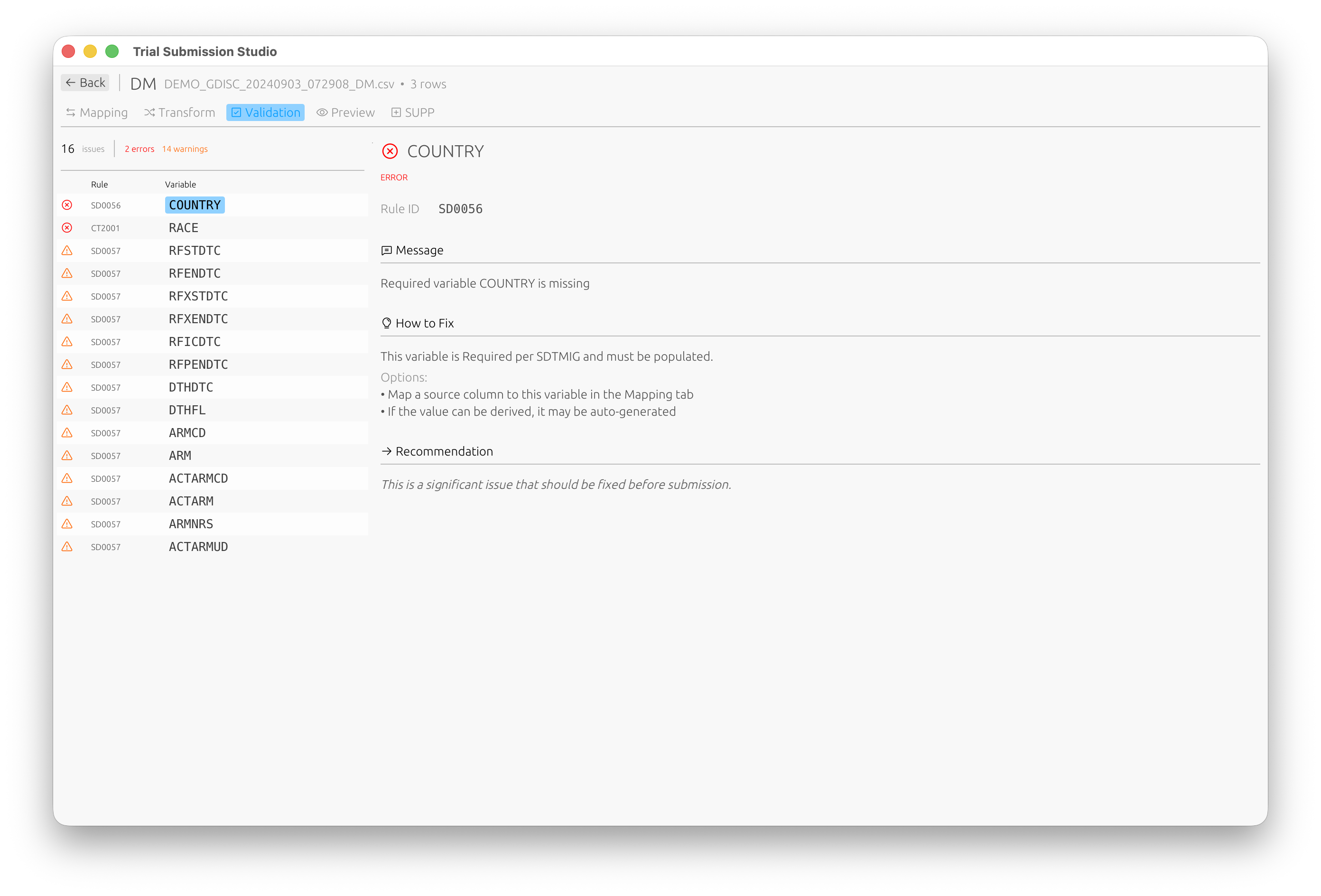
Validation Overview
flowchart LR
    subgraph Input
        DATA[Mapped Data]
    end

    subgraph Checks
        STRUCT[Structure<br/>Required variables]
        CT[Terminology<br/>Codelist values]
        CROSS[Cross-Domain<br/>Consistency]
    end

    subgraph Output
        ERR[Errors]
        WARN[Warnings]
        INFO[Info]
    end

    DATA --> STRUCT --> CT --> CROSS
    STRUCT --> ERR
    CT --> WARN
    CROSS --> INFO
    style ERR fill: #f8d7da, stroke: #721c24
    style WARN fill: #fff3cd, stroke: #856404
    style INFO fill: #d1ecf1, stroke: #0c5460
Validation checks ensure your data:
- Conforms to SDTM structure
- Uses correct controlled terminology
- Meets FDA submission requirements
Running Validation
Automatic Validation
Validation runs automatically when you:
- Complete column mapping
- Make changes to mappings
- Prepare for export
Manual Validation
Click Validate in the toolbar or press Ctrl+R (⌘R on macOS).
Validation Results
Result Categories
| Category | Icon | Description |
|---|---|---|
| Error | Red | Must be fixed before export |
| Warning | Yellow | Should be reviewed |
| Info | Blue | Informational, no action required |
Results Panel
┌─────────────────────────────────────────────────────────────┐
│ Validation Results                           [✓] [⚠] [ℹ]   │
├─────────────────────────────────────────────────────────────┤
│ ❌ SD0001: USUBJID is required but not mapped               │
│    Rows affected: All                                        │
│    Fix: Map a column to USUBJID                             │
├─────────────────────────────────────────────────────────────┤
│ ⚠️ CT0015: Value "M" not in SEX codelist                    │
│    Rows affected: 45, 67, 89                                │
│    Expected: MALE, FEMALE, UNKNOWN                          │
├─────────────────────────────────────────────────────────────┤
│ ℹ️ INFO: 1250 rows will be exported                         │
└─────────────────────────────────────────────────────────────┘
Validation Rules
Structural Rules
| Rule ID | Description |
|---|---|
| SD0001 | Required variable missing |
| SD0002 | Invalid variable name |
| SD0003 | Variable length exceeded |
| SD0004 | Invalid data type |
Controlled Terminology Rules
| Rule ID | Description |
|---|---|
| CT0001 | Value not in codelist |
| CT0002 | Codelist not found |
| CT0003 | Invalid date format |
Cross-Domain Rules
| Rule ID | Description |
|---|---|
| XD0001 | USUBJID not consistent |
| XD0002 | Missing parent record |
| XD0003 | Duplicate keys |
Fixing Validation Errors
Mapping Errors
- Click on the error message
- The relevant mapping is highlighted
- Adjust the mapping or source data
Data Errors
- Note the affected rows
- Correct the source data
- Re-import and re-validate
Terminology Errors
- Review the expected values
- Map source values to controlled terms
- Or update source data to use standard terms
Controlled Terminology Validation
Supported Codelists
Trial Submission Studio includes embedded controlled terminology:
- CDISC CT 2025-09-26 (latest)
- CDISC CT 2025-03-28
- CDISC CT 2024-03-29
Codelist Validation
For variables like SEX, RACE, COUNTRY:
- Source values are checked against valid terms
- Invalid values are flagged
- Suggestions for correct values are provided
Validation Reports
Export Validation Report
- Complete validation
- File → Export Validation Report
- Choose format (PDF, HTML, CSV)
- Save the report
Report Contents
- Summary statistics
- All validation messages
- Affected data rows
- Recommendations
Best Practices
- Validate early and often - Fix issues as you go
- Address errors first - Then warnings
- Document exceptions - If warnings are intentional
- Keep validation reports - For audit trails
Next Steps
- Exporting Data - Export validated data
- Controlled Terminology - CT reference